
HYBRID EXECUTION
Native services and containers, together.
Run Spring Boot, Node, Go or Rust directly through their own toolchain while PostgreSQL, Redis and RabbitMQ stay containerized. Forge treats both as first-class resources.
Forge is a lightweight desktop control centre for local distributed development. Run native services and containers together, start only what you need, and see everything in one place.
Everything your stack needs, understood by Forge.
services · gateways · workers
postgres · mongo · mysql
redis · memcached
rabbitmq · kafka · nats
typesense · elasticsearch
minio · s3-compatible
keycloak · mailpit
aws · stripe · twilio
Native processes and containers are first-class citizens — mix them freely.
THE WORKSPACE
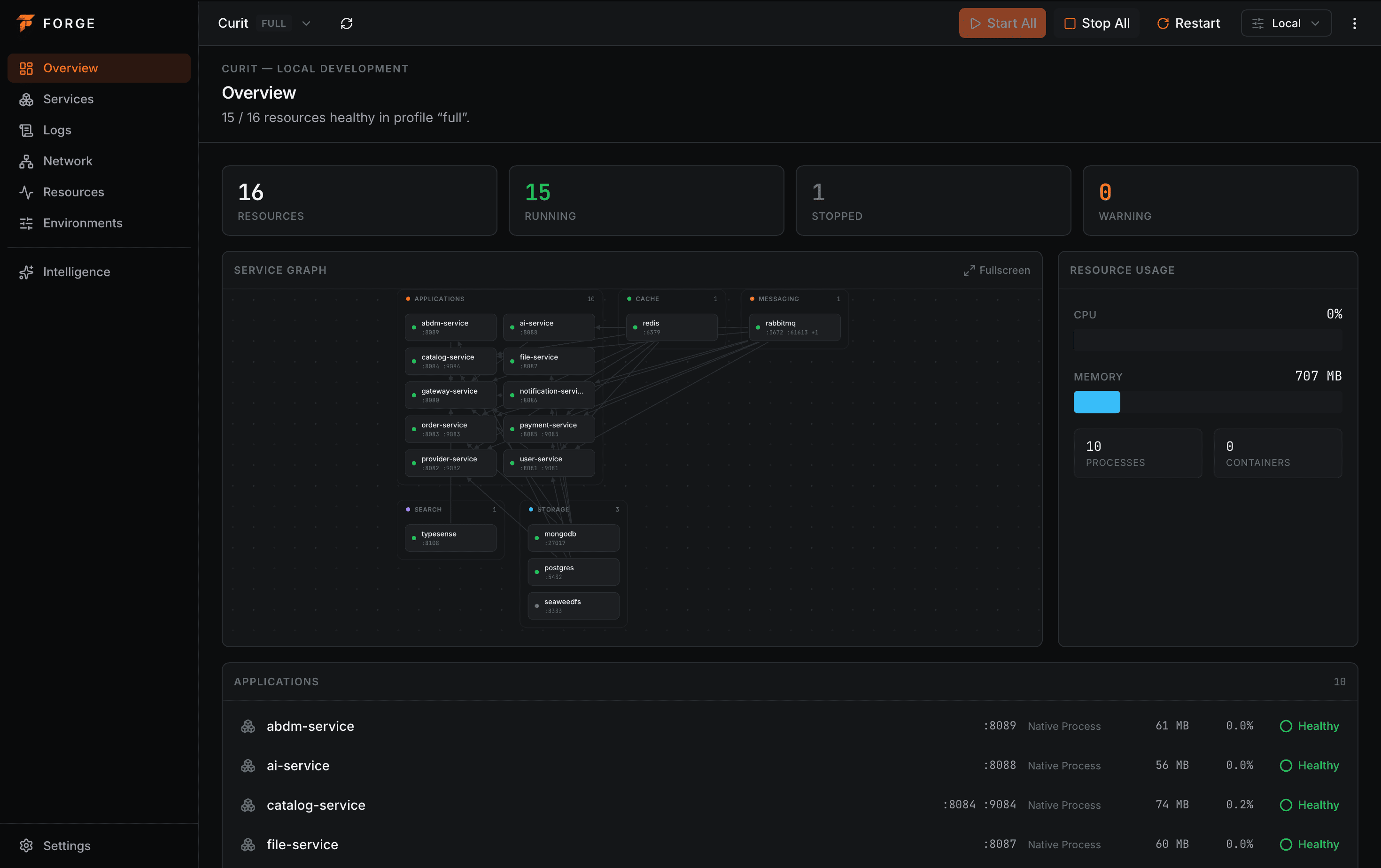
Stop juggling terminals. Forge shows what is running, what is broken, what depends on what, and where every byte of memory is going.
overview — Every resource, grouped by role, with a live dependency graph and workspace resource usage.
BUILT FOR REAL WORK
Forge does not try to be Kubernetes or Docker. It focuses on the one thing they do not: making your local environment simple to run and understand.
Run Spring Boot, Node, Go or Rust directly through their own toolchain while PostgreSQL, Redis and RabbitMQ stay containerized. Forge treats both as first-class resources.
Declare depends_on and Forge resolves the graph, starts what is missing, waits for readiness, and reports failures instead of leaving you guessing.
Distinguish "the process exists" from "the service is ready". HTTP, TCP and command checks drive clear, real-time states.
Aggregate logs from native processes and containers, filter by resource or level, search, and jump from an error to its context.
CPU and memory per resource and for the whole workspace. Forecast before your laptop starts to sweat.
Describe the environment in a readable forge.yaml, share it through Git, and let anyone reproduce it with one command.
CLONE → OPEN → START → CODE
A newly onboarded developer reproduces the whole environment with minimal manual setup.
Write a forge.yaml — resources, ports, commands, images, dependencies and profiles. Commit it with your code.
workspace:
  name: my-project
Minimal, Backend, Payments or Full. Start only the services you need right now, not the whole platform.
profiles:
  backend: [gateway, user-service]
Dependencies start first and are waited on for readiness. Failures propagate to dependents, clearly and immediately.
gateway → user-service → postgres
Watch health, tail logs, read metrics, restart a single service. No local cluster, no wall of terminals.
environment ready in 14.8s
WHY FORGE
Containers alone are heavy for application code; Kubernetes is overkill for a feature branch. Forge sits in between.
| Forge | Docker Compose | Local Kubernetes | Terminals & scripts | |
|---|---|---|---|---|
| Native processes and containers, together | ||||
| Dependency-aware startup with readiness | ||||
| Configuration committed to Git | ||||
| Per-resource health and logs in one place | ||||
| CPU and memory per resource | ||||
| No control plane, no cluster | ||||
| Lightweight control plane |
GET STARTED
Free, native, and built with Tauri. macOS · Windows · Linux.
QUESTIONS
Everything you might ask before pointing Forge at a real project.
No. Forge is the developer-experience layer above your local processes and container runtime. It runs your application services as native processes and your infrastructure through Docker — it does not implement isolation itself or try to reproduce production orchestration.
Not at all. Native processes are first-class. Run ./gradlew bootRun, npm run dev, cargo run or go run while databases, caches and brokers stay in containers.
A readable forge.yaml committed to Git. It describes resources, ports, dependencies, health checks, profiles and actions, so anyone can reproduce the environment with minimal setup.
A native desktop app for macOS, Windows and Linux, built with Tauri and Rust. Containers require a local Docker-compatible runtime; everything else runs directly on your machine.
Lightweight by design. The control plane stays minimal and there is no Kubernetes control plane. You start only the resources you need, per profile.
Open your repository, start a profile, and get to work.